
Q&A
 Q&A
Q&A
Common Problem
?Q
What Is the Difference Between Compliance and Overvoltage Protection (OVP) on an SMU?
Compliance Limit (e.g., Voltage/Current Compliance): In current source mode, a voltage compliance limit can be set so that the output voltage does not exceed the specified limit. Once the compliance limit is reached, the current will no longer increase. Similarly, in voltage source mode, a current compliance limit can be set. (If no value is specified, the system uses the default setting.)
Overvoltage Protection (OVP): OVP is a hardware-level global protection mechanism designed to protect both personnel and the instrument. The voltage source output cannot exceed the configured OVP limit.
?Q
SMU - what should I pay attention to when measuring a small resistance value? If the inductance is measured, the resistance of the measured inductance is 0.02 ohm.
When measuring low resistance, 4-Wire mode (Kelvin connection) must be used.

Source of Error: With a conventional 2-wire measurement, the resistance of the test leads themselves may exceed the 0.02 Ω resistance of the inductor under test, masking the actual measurement result.
Recommended Connection: A Kelvin connection uses four leads to place the voltage sense points closer to the DUT, effectively eliminating the impact of lead resistance on the measurement and enabling more accurate voltage sourcing and measurement.
Kelvin connections are typically used when accurate low-resistance measurements are required.
?Q
Can the refresh rate of the SMU be improved?
?Q
Why is the measured I-V curve nonlinear (rather than a straight line) when performing a sweep in Auto Range mode?
When Auto Range is enabled, minor fluctuations may occur in the measured data as the instrument switches ranges during a sweep. Therefore, Fixed Range mode is recommended instead of Auto Range for sweep measurements.

Recommended Configuration: For sweep measurements, both the voltage and current ranges should be set to fixed ranges.
For example, for a current sweep from 0.5 A to 1 A, the current range can be fixed at 1.5 A.
?Q
Why do two different meters measure the dark current of the same material differently?
This is typically caused by improper measurement range selection.
Cause: Dark current is typically extremely low. If the selected range is too high, the measurement resolution may be insufficient, resulting in significant measurement errors.

100 μA Range
Solution: When measuring dark current, manually select an appropriate low-current range (for example, set and fix the current range at 1 μA). Once the appropriate range is selected and fixed, accurate and consistent measurement results can be obtained.

1 μA Range
?Q
Why does the GUI display 65535 and above error codes when the error code tester tests
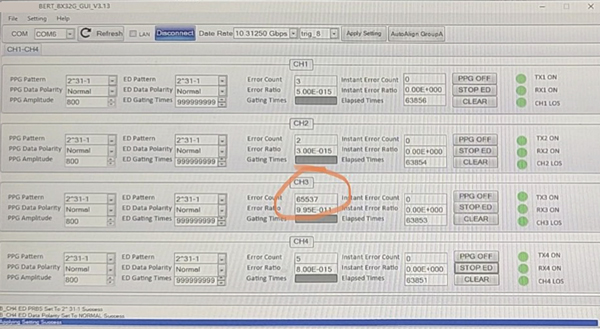
The error code is too large, and the error code test overflows. Pay attention to equipment grounding.
?Q
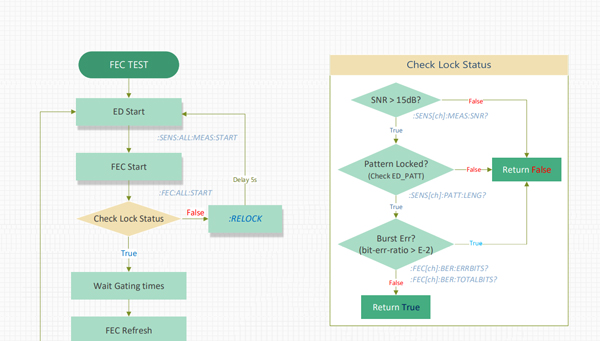
The bit error test instrument writes ate according to the process. Why is it possible that the eye chart test is interrupted during the test process
Confirm whether the sensitivity test is synchronized with the eye chart test. If it is judged that the lock is lost during the sensitivity test, the relock command will be executed. This operation will reinitialize the TX end. If the eye chart test is in progress at this time, the test will be interrupted.
?Q
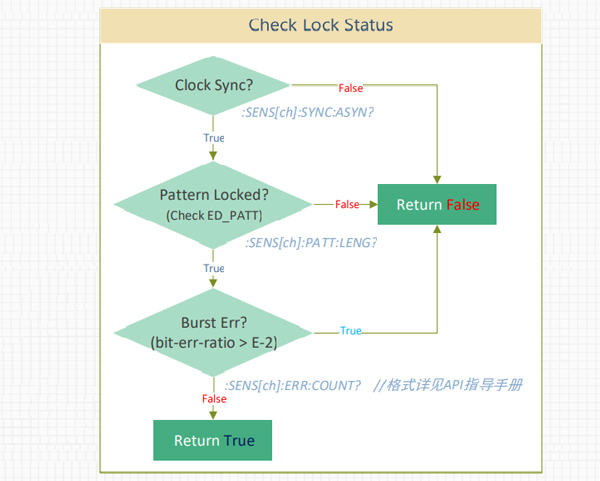
Why does the automatic error test instrument always read large errors
The probability is a problem of the test process. After the configuration is completed, it is necessary to judge the locking status of the module before starting the bit error test.
?Q
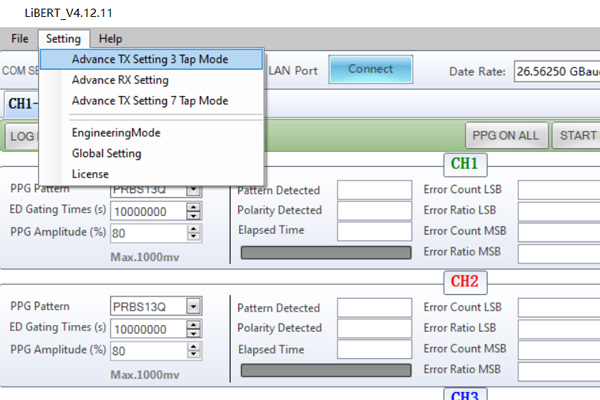
Why does the eye pattern test deteriorate when the bit error test instrument is replaced?
After confirming that the test environment is OK, it is necessary to adjust the pre emphasis according to the environment and the product, as shown in the following figure.
Service hotline
Follow
Name
E-mail verfication code
Phone
Password
Confirm Password
Authorization Key
E-mail address
E-mail verification code
New Password
Confirm Password